Tuesday, December 6, 2011

Optional CALL

Week#7

Sacramento Survival Guide


Photo Uploading: Guide    Picasaweb.google.com


Another Option: Facebook 


PUFS TTP Facebook Group

__________________________________
Skype
Register for an account at http://www.skype.com/go/join?intcmp=join
If you don't have Skype on your computer, download it here: http://www.skype.com/intl/en/get-skype/on-your-computer/windows/
Start the program and login.
Skype Guide

Google+ Hangouts
Guide to creating and joining a Google+ Hangout

Video Email
Register here: http://eyejot.com/join
Click 'Compose New Message'

Week#6


Electronic Village Online


January 8~February 12, 2012


Becoming a Webhead 2012 Multiliteracies for Social Networking and Collaborative Learning Environments TESOL-Drama Workshop: Implementing and Evaluating the Facilitation of English Language learning through Drama
Digital Storytelling for Young Learners Digital Tools with Purpose in the Classroom PLEs and PLNs for Lifelong Learning 
Teaching and Language Learning Through Gamification MachinEVO 
Video Productions of Language Learning Conversations
Teaching English to Young Learners and Teens
Developing our Mentoring Skills MOODLE for Teachers Podcasting for the EFL/ESL Classroom
Social Networking: Making it Work for You and Your Students!
Tutoring with Web 2.0 Tools - Designing for Social Presence


Pages of Note
BaW 2011 Favorite Tools
Multiliteracy Tutorials
Digital Tools Group Favorite Tools


Digital Tools Participant Map


View EVO2012 DigitalTools Participants in a larger map


Week#5 - Activities Revisited

New Activity Sites
Favorites
Others
Sites designed specifically to provide test taking peparation
Online Activity Generators


Week#4 

Make your own comics and animations


Week#3

Video capturing and editing
   Sites that can be used to download video from YouTube
  Window Live Movie Maker Guides 
____________________________________
Screencapturing & Screensharing
________________________________________

Week#2

Go to this Google Doc and add your Skype ID and Gmail Address

Skype
Register for an account at http://www.skype.com/go/join?intcmp=join
If you don't have Skype on your computer, download it here: http://www.skype.com/intl/en/get-skype/on-your-computer/windows/
Start the program and login.
Skype Guide

Google+ Hangouts
Guide to creating and joining a Google+ Hangout

Video Email
Register here: http://eyejot.com/join
Click 'Compose New Message'

Interactive Presentation Environments
Blackboard Collaborate
Video example - Collaborate Recording
Webhead Recordings    Classroom20 Recordings

Try joining a Collaborate room at Webheads http://home.learningtimes.net/learningtimes?go=273662
Click Join. Then Login and click 'Enter Now'
Save the 'meeting.php' file and open it.  Click Run

Classroom2.0 Site  &  Upcoming Events
WebheadsinAction  EVO2012 Workshops

----------------------------------------------

Week#1

Tuesday, October 18, 2011

Week#6


Let's 'Hangout'  
Plug in your headset.
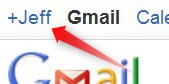
Click on the little +YourName at the very upper left of your gmail window.

Getting started with Google+ here
If you see 'Jeffrey Lebow is hanging out", click 'Join this Hangout'.
Hang out.  Smile when Jeff takes the Class Hangout Screenshot Picture.

(Hangout Guide Here)
For information about a similar tool, check out the Skype Guide
Something to think about: How might you use Google Hangout in your teaching and personal life?


Next, let's play with Todaysmeet.com
Go to http://todaysmeet.com/LearningCall
Enter your name and click Join.


Type something and click 'Say'.


Chat and answer Jeff's Super Challenge questions as quickly as possible

Something to think about: How might you use this kind of tool for educational purposes?


Social Networking:  Google+ is one of the newest 'social netwoking' sites out there.  You can find infomration about many others in the 
Social Networking Guide.
For now, the most popular social networking site on the planet is Facebook. I've created a
PUFS TTP Fall 2011 Group here.
 In the past,  this has been used as a way for TTP participants to share photos and resources during the program and stay in touch afterward.  It's also useful for connected with people you might while in the U.S. To join, you'll need to create a Facebook account (if you don't already have one), click on the above link. People who are already in the group can add 'friends' to it.
If you'd like to become 'friends' with Jeff, you can do so here by clicking 'Add Friend'.

For information about Twitter, LinkedIn, and other ELT Groups, check out the Social Networking Guide.  (optional)


Spend the rest of class doing one or more of the following:

Review assorted skills
- Make a  Hot Potatoes Activitiy
- Record audio with Audacity and post it on your blog
- Post photos and videos on your blog
- Create a Google Presentation or Prezi
- Check your Google Reader and comment on blogs
- Sample the website buffet and use Diigo to bookmark sites of interest

AND/OR

Experiment with some new ones
- Create a PBWorks account and upload an html or mp3 file there.  This will allow you to have your own space for uploading those kinds of files.
- Experiment with social networking.  Create a Twitter account and find people to follow. Explore some of the Language Learning communities out there.
- Experiment with chat tools like TodaysMeet, Voki, or Natural Reader

AND/OR

Write a blog post about...
...the 5 most useful CALL resources you've seen (in this class or elsewhere) with short descriptions of why you like them.
or
...how you might use CALL tools in your teaching


Wednesday, October 12, 2011

Getting Started with Google+

To get started with Google+, click on the +YourName in the upper left of your Gmail Window (or go to plus.google.com)

The first time you use Google+, you'll need to enter information about gender and age. Click Join. 


You'll see several screens that ask you about profile information and adding people to circles.  You can enter information or ignore and click 'continue' each time. 

If you see Jeffrey Lebow at some point, click 'Add to circles'. 

 Then 'create new circle' and enter 'TTP'.


If you see 'Jeffrey Lebow is hanging out", click 'Join this Hangout'.
Hang out.  Smile when Jeff takes the Class Hangout Screenshot Picture.


Additional Google+ Links


Wednesday, October 5, 2011

Week#5

 The CALL Buffet - Week#5
Choose the buffet items of most interest and dig in! You will probably NOT have enough time to do all of the tasks mentioned.
________________________________________________________
Presentations:
Take a look at the Presentation Guide.
Task: Look at some of the specific examples there. Try to embed one on your blog. (see presentation guide for details on how to do this.  Example here)
Optional Tasks: Try to create and embed a Google presentation (guide here) on your blog.  Try to create your first prezi.
________________________________________________________
Audio
Look at the Audio Guide
Tasks:
- Explore
the sites listed there and Bookmark at least 2 audio sites using Diigo
- Use Audacity to record an mp3 file.
- Upload it to: JeffLebow.net/ttp-files 
     ID: pufsttp  Password: 4CALL-fun
     Edit/Choose File / Upload / SAVE
- Post that audio file on your blog with a short description (guide here) (example here)
________________________________________________________
Video
Look at the Video Guide
- Explore the sites listed there and Bookmark at least 2 video sites using Diigo
- Go to YouTube.com, find any video of interest and post it on your blog (instructions here)
- Use a video download site to save a video file from a YouTube Video
- Use your webcam to create and post your own video on YouTube.  Become a YouTube Star!

_________________________________________________________
At the end of class, use Google Reader to see what your classmates have posted and make a couple of comments.

Wednesday, September 28, 2011

Week#4


Post photos to your blog.
The easiest way to do this is shown
here in the Blogger Guide. Example here
If you’d like to experiment with Google’s Photo service Picasa, here’s how.
Picasa allows you to create and
embed slideshows like this on your blog. Task: post at least 5 photos with short descriptions on your blog (either five in one single post or fives posts with one photo each).


Use Google Reader to subscribe to blogs (your classmates and many others). Download the PUFSTTP-Fall2011.opml here
Google Reader Guide Here
Task: import the above opml file and browse some of the blogs you’re subscribed to.


Comment on your classmates’ blogs.  Toward the end of class, use your Google reader to look through you classmates blogs. Task: Make at least two comments.


Update your blog
Task: If you haven’t already done so, edit your ‘About Me’ page to include a short introduction.


Diigo Review:
Task: Edit the 'Resources Page of your blog. Add a link to your Diigo page.
Then browse from the websites buffet and bookmark at least three sites using Diigo. (Diigo Guide here)


Take a look at the Presentation Guide.
Task: Look at some of the specific examples there. Try to embed one on your blog.
Optional Tasks: Try to create and embed a Google presentation (guide here) on your blog.  Try to create your first prezi.

Wednesday, September 21, 2011

Week#3


CALL Week#3 Agenda
Hot Potatoes & Activity Websites


  • Go to the Activities Guide and follow instructions.
    - Look at Hot Potatoes examples
    - Create any kind of Hot Potatoes activity. The activity can be very simple (i.e. a 3 questions quiz, a gap activity with a few blanks, etc.). Look at the Hot Potatoes Guide for help.
    - Save the HP activity (Save as & Create webpage) in c:\temp and save a copy on your USB drive. Make sure the file name includes your name and class#.
    ______________________________________________________________

    -
    (Optional) Post a Hot Potatoes Activity on your  blog.  
    - Create a ‘new post’ on your blog.
    - Then paste this code into a blog post (make sure to use  'Edit HTML tab, not Compose tab)
     <iframe src="URL Here" frameborder="0" height="500" width="600" scrolling="auto"></iframe> (to find that code, click Questions on the LearningCall.net menu.
                                                                                                 Click on Hot Potatoes Question)

    - In another tab, upload that the Hot Potatoes html file to JeffLebow.net/ttp-files
          (access info on handout)
    - Once the file is attached and the post saved, RIGHT click the html file and 'copy link location'.
    -  In your 'new post' , paste that URL into the the code where it says 'URL Here'.
    _____________________________________________________________
     
  • (Optional) Use Google Forms or and try to create a basic quiz or survey with at least two questions. Post a link to that quiz (or embed it) in a blog entry on your blogger.com blog.
     
  • Explore some of the websites on the Activities Guide which have many, many different kinds of activities. Remember to use Diigo to bookmarks sites you might want to visit again.
     
  • HOMEWORK - Bring five digital photos with you to class. Try to choose photos of things that are important to you (people, places, events, etc.)